
Calendar app + AI planning
Everything Star Task Does Around Your Calendar
Scan schedules, track past and future events, color-code lists, and turn Text, Voice, Documents, or Links into calendar-ready reminders. Cross-platform silence and restore controls keep reminders useful in real life, from movie seats to work meetings.
On this page
Calendar View
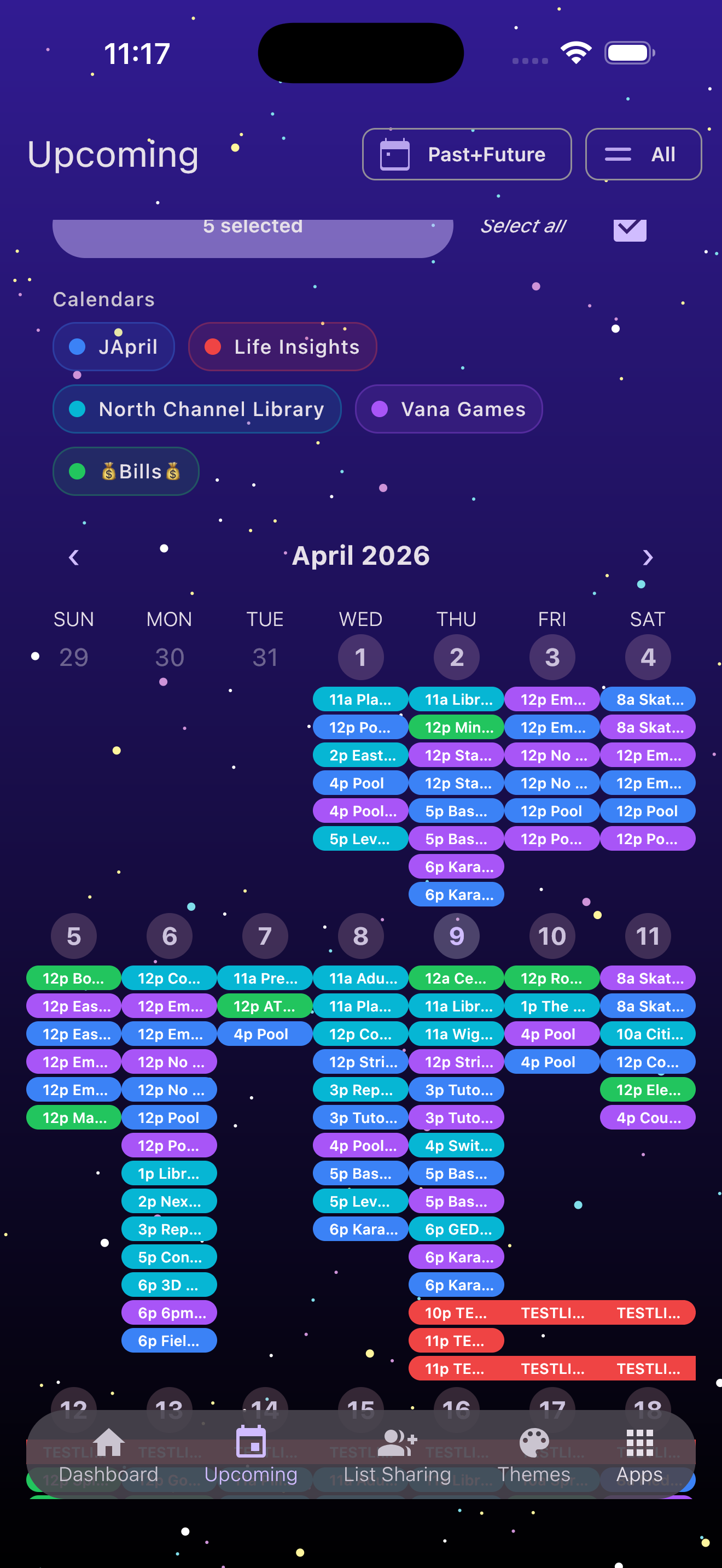
Star Task now gives your work a calendar surface, not just a list stack. View past and future items by month, filter the calendar by list, and keep visually distinct plans with list colors.
Past + Future
Jump beyond today so old commitments and upcoming work stay in one timeline.
Color-Coded Lists
Each calendar list can carry its own color so packed days are easier to scan.
Calendar Filters
Select all lists or narrow the view to the calendars that matter right now.
Scan Calendar
When a schedule already exists on paper, in a screenshot, or in a calendar photo, Star Task helps you turn that visual chaos into usable reminders. Capture, crop, scan, and let AI convert visible events into tasks you can review and keep.
- Use the camera or an existing calendar image as the source.
- Crop the calendar before scanning so the AI focuses on the right schedule.
- See progress while Star Task reads events, creates reminders, and saves them into your plan.
- Keep a backup of captured calendar photos where supported, so one-time calendars are not lost after scanning.
Frictionless Start
- Sign in with Apple or Google: Secure OAuth. You stay signed in until you log out from Settings.
- Calendar Welcome Guide: When you are new, Star Task points you toward scanning a calendar, adding items manually, and understanding what lands in Upcoming.
- Dashboard: Lists still live here—beautiful, draggable, and saved locally for a fast feel.
- Top App Bar: Profile avatar, Edit (rename / delete / merge lists), Search, Scan Calendar, and the AI button.
- Quick Create: The “+” adds a list with smart name suggestions. A secondary mic button (tunable in Display Settings) speeds voice workflows.
AI Modal · Four Inputs, Calendar-Ready Output
Tap the AI button to open a sleek bottom sheet with four input tabs and list types that can become tasks, summaries, brainstorms, or reminders.
Inputs
- AI Text: paste or type, then submit.
- AI Voice: Quick Command (instant) or Record & Transcribe (full note-taking). Shows remaining minutes and lets you pick audio files.
- AI Document: upload common document formats and auto-generate a list.
- AI Link: paste a URL and turn it into tasks.
List Types
- Bullet Point List: classic task list; toggle optional notes; choose 5 / 10 / 15 items.
- Reminder List: sub-dropdown for Auto, Banner + Sound, Banner (Silent), ready for Upcoming and Calendar.
- Summary List: condense content into actionable tasks.
- Brainstorm List: expand ideas with chip counts (10 / 14 / 20).
Lists & List View
- Cards that feel great: tap any task to open details.
- Edit Mode: duplicate, delete, or copy a task’s name + notes + subtasks to clipboard.
- AI Suggestions: get ~10+ task ideas based on the list name; tap Add to insert.
- Rapid Add: an outlined text field under the top bar for fast, continuous entry.
- More Options: sort (name / due / priority / number), copy the whole list as text, collapse long tasks, reorder with cloud-saved order for shared lists, and hide/show completed.
Task Detail
- Edit name, due date, priority, attachment thumbnail, and labels.
- Label Manager: create/delete global labels; add/remove task labels.
- Duplicate: None / Daily / Weekly / Monthly.
- Highlight, mark complete/incomplete.
- Subtasks: unlimited; can include a pressable URL icon.
- Shows date created and supports manual reminder setup.
Unstoppable Cross-Platform Reminders
Star Task’s reminders connect the calendar, task details, and Upcoming screen so a due date is never just hidden in one view. They are built for real interruptions: silence everything before a movie, meeting, class, or quiet shift, then restore reminders when you are ready.
- Cross-platform control: manage reminder state across iOS and Android workflows instead of babysitting each task one by one.
- Types: Don’t remind or Remind when due, then choose Banner + Sound or Banner (Silent).
- Frequency: hourly, daily, weekly, monthly, every 10 minutes, or every 30 minutes.
- Repeat Duration: default Forever or pick 1–24 hours. Banners stop after the window even if you don’t interact.
- Auto-update: dismissing updates the task’s due date + reminder in Firestore, so Upcoming and Calendar stay accurate.
- Note: iOS banners respect Do Not Disturb.
Upcoming & Device Controls
- See all tasks sorted by earliest due date, with a days-until counter.
- Filter by list with a simple dropdown.
- Use color-coded calendar legend dots to understand where each event came from at a glance.
- Device Controls: Silence all reminders on this device before a movie or meeting, Restore all reminders from cloud afterward, or Permanently delete all reminders from cloud.
- Tasks show Reminder Active when a local reminder is running on the device.
Live List Sharing
- Invite anyone on Star Task. See pending invites you sent or received.
- View lists you’ve joined and leave when you’re done.
- See who’s on lists you own and remove members if needed.
- Shared lists keep the same drag-reorder order in the cloud.
Display Settings
Readability
- List title size, task title size, notes size.
- Snooze length slider for reminders.
- Choose sound: Crystal Overpass or default iOS.
Power User
- Save current lists/tasks to cloud; load previous sets.
- Restore purchases, manage subscriptions.
- Delete content or your account.
- Optional: add your own OpenAI API key to unlock GPT-4 Omni.
- Configure the secondary mic button behavior.
Custom Background
$4.99 one-time (or included in Premium): upload your own background and adjust opacity.
Beautiful Themes
Star Task offers a variety of stunning themes to personalize your task management experience. Each theme supports both light and dark modes, letting you customize the look and feel of the app to match your style and mood:
- Included: Cosmic Dawn (free).
- Purchasable ($0.99): Daybreak, Alive, Elemental Green, Charge, Peach, Rejuvenating Whisper, Withering Whisper. Each has Light, Dark, or System.
- Daybreak: A bright and cheerful theme designed to inspire positivity and energy.
- Alive: A vibrant and dynamic theme that energizes your workflow.
- Charge: A bold and motivating theme that keeps you focused on your goals.
- Elemental Green: A soothing green theme that fosters calm and balance during busy days.
- Peach: A warm and elegant theme that adds a touch of softness to your tasks.
- Rejuvenating Whisper: A refreshing and tranquil theme perfect for staying relaxed and productive.
- Withering Whisper: A mysterious and captivating theme that brings depth and intrigue to task management.
- Cosmic Dawn: A radiant and cosmic-themed experience, available for free to all users who download Star Task or purchase a subscription. Celebrate productivity in style!
Profile & Stats
- Editable avatar (Apple/Google), display name, unique handle, and bio. Gear icon → Settings.
- Account Tier Card: Free or Star Task Premium with View Details & Subscribe actions.
- Three Stats Cards:
- Total logins (launches & relaunches).
- Total lists, total tasks, AI-powered reminders count.
- Star Chaos Collection: shows owned animated themes with tiny preview icons.
Free, Premium, and AI Minutes
Free Tier
- 2 lists
- 20 tasks per list
- Unlimited subtasks
- Calendar view for your due dates
- Cosmic Dawn theme
Star Task Premium
$1.99 / month or $19.99 / year (15% off)
- Practically unlimited lists and tasks
- Expanded calendar and scan-calendar planning
- All Star Chaos themes
- 100 AI Voice minutes
- Custom background upload with opacity control
AI Voice Minutes
- 60 min – $0.99
- 300 min – $4.99
- 1200 min – $9.99
Buy from: AI → Voice → Record & Transcribe → Get more minutes.
New Navigation · Bottom Bar + Apps Modal
- 4 quick tabs on the bottom bar (e.g., Dashboard, Upcoming/Calendar, Stats, Social) + All Apps button.
- More opens a modal drawer showing bottom row (mirrors bottom bar), extra apps above, and a top row with a colored icon “Reorder apps here”.
- Reorder Screen: drag to move tabs between pinned and unpinned; bottom bar updates live (Outlook-style).
Privacy & Security
- Sign in with Apple and Google OAuth.
- Data synced securely via Firebase.
- Delete your content, or your whole account, anytime.
We never sell your data.
Your Calendar, Reminders, and AI Lists in One Place
Star Task isn’t just another to-do app. It is a calendar-first system for turning schedules, notes, links, and conversations into reminders you can trust.